Friday, May 8, 2015

Nexus 6 Review

I've had my Nexus 6 for about two months now and I love it. I was a bit skeptical because I only bought it for the unlocked bootloader and developer support. Which means I was also getting a phone codenamed "Shamu" that was facing numerous issues with encryption and memory leaks and weird screen problems. I was the most disappointed person in the room when Google announced the 6" monstrosity that is the Nexus 6. I put off by a lot of the news with the specs because it became apparent that Google might actually care about sales for once. Regardless, I am one of few customers who value their level of tinkering over everything else about the phone. To be honest if the Nexus 5 worked on Verizon I'd have bought it instead because I would have a smaller phone that I could still tinker with despite it being a year old. All of this considered I really like this phone, more than I
thought I would.

Specs

OS: Android 5.1 Lollipop
Display -
     Size: 6"
     Resolution: 1440x2560p QHD
     Tech: AMOLED
Camera - 
     13 megapixels
     4K video capable
     2 Megapixel front facing
Hardware - 
     SoC: Qualcomm Snapdragon 805
     Processor: Quad Core Krait 450 - 2.7 Ghz
     Memory: 3GB
     GPU - Adreno 420
     Storage - 32GB or 64GB
Battery - 3220mAh
Wireless Qi Charging - Yes
Bluetooth - 4.1
WiFi - 802.11 a, b, g, n, ac
USB - 2.0 micro
Can be used on any carrier with any radio type.
Qualcomm Turbo Char
ging 2.0

Source: Phone Arena

Beyond the Specs

Sunday, May 3, 2015

ES File Explorer App Impressions

ES File Explorer icon for the Google Play Store
ES File Explorer does exactly what it sounds like, allows you to view your files. The reason I am reviewing this app is because I owe these devs some due diligence by reviewing the app. I've been using this app since I got my Motorola Droid X2 back in 2011. Since then I haven't even tried another app. I'm sure some of you are thinking, "whatever its just a file manager, nothing groundbreaking." I agree it isn't much but considering I root my phone and using the file system to move things around is necessary I need an app to rely on if I break something. ES has been great all along, they even have a Chromecast extension you can add on so you can cast videos and music from your phone.

ES File Explorer is a completely free app and after doing some digging you can't even give the company money if you wanted to, no donate buttons, no ads, but they still support the app many years later. I highly recommend this app to everybody. Plus it is free so it can't hurt to give it a shot.

ES File Explorer - Google Play

Sunday, April 26, 2015

Why I Root Rant

XDA's exclaimer to users sums up the risks of rooting:

*
 * Your warranty is now void.
 *
 * We are not responsible for bricked devices, dead SD cards,
 * thermonuclear war, or you getting fired because the alarm app failed. Please
 * do some research if you have any concerns about features included in this ROM
 * before flashing it! YOU are choosing to make these modifications, and if
 * you point the finger at us for messing up your device, we will laugh at you.
 *
 */
Superuser Android Root Icon
So why risk it? What are the rewards? Do I get free apps?!

No you don't get free apps and I don't understand why that is the first question everybody asks. You can get apps free (on Android) without rooting, its called sideloading. Regardless this isn't for free apps, I pay for all mine because I believe in supporting the developers. 

So why root? I root because I like to customize my phone. The Android rooting community brought us heads up notifications, lockscreen notifications (actually Apple did but ROM devs did it on Android first), and a whole lot more that has all been added to Android in the spirit of open source and sharing ideas and features. Take a look at the features that have come to Lollipop.

Saturday, April 25, 2015

If I Were A Smartphone Manufacturer

Have you ever thought about your dream smartphone? What would it have inside? What would you sacrifice and why? Every time a flagship comes out reviewers always mention what could have been done better. As a business student tech enthusiast I find the whole line of smartphones that companies offer interesting and often ask myself why they make certain decisions. A year ago I wrote a huge paper about a fictional company I made up called Core Mobility and yes, there is a company with that name already but I liked it and it was just a school paper so it didn't matter. The fun part was getting to talk about a potential business model. I stole ideas from various manufacturers that I really liked and thought were really great selling points. Motorola, who at the time had just released the Moto X (2013), was a big inspiration because I really really liked that phone. Some day I'll write a review about it because it truly is one of the best phones ever made. It was also when the OnePlus One has first graced the market with its low price and high specs. Then of course manufacturers like Samsung who confuse the hell out of anybody who tries to figure out which device is meant for which people so I made it a goal to have distinguishable product lines marketing each one to different people. So without further ado I will give a rundown of what I would do if I were a smartphone manufacturer.

Company: Animax Mobility

Device Lines:

Friday, March 6, 2015

Google MVNO [Confirmed] | Will Only Support Nexus 6? [Rumor]

Google Logo
Google's Sundar Pichai made an official announcement confirming rumors that Google intends to become a MVNO carrier later this year. Google's service is a very unique one, it involves using both T-Mobile and Sprint networks simultaneously depending on the best signal. The reason this is so intriguing is because T-Mobile uses GSM technology while Sprint uses CDMA. Currently there is only one phone (at least that I know of) that is capable of switching between the two, that is the Nexus 6. Unlike most phones which release a different version of the hardware for each carrier, or at least different hardware between GSM and CDMA carriers. The Nexus 6 come packed with radios for all carriers in the US despite carrier branding. Save for whitelisting IMEI numbers for devices purchased from certain places I could hypothetically use my Nexus 6 on any carrier by popping in a different SIM card.


Google had planned to be an MVNO carrier a long time ago (obviously) and it explains why they designed the phone the way they did. With its ability to use Enhanced LTE features, the legacy radios are kind of just there wasting space but if Google's service can't take advantage of VoLTE or they are compensating for T-Mobile's and Sprint's, spotty, coverage outside highly populated areas then they are more necessary. Ironically the past issue with Nexus devices for Verizon users has been lack of CDMA support on Verizon, and now the Verizon release is rumored to be using VoLTE and other Enhanced LTE features thus making the legacy CDMA radio useless. Times are changing folks, and one day all carriers will be relying solely on LTE and there will be no more CDMA or GSM, just LTE (technically is a GSM band though).


So while the news that you'll only be able to use the Nexus 6 with Google's service is still just a rumor, there is sufficient evidence in the device alone to say that its likely true.

Source:
 Phone Arena
Android Police

Thursday, February 26, 2015

Verizon Nexus 6 - What 2/26 Really Meant

Many Verizon users like me have been anxiously been awaiting the release of the Nexus 6 so we can use our upgrades and finally enjoy the return of the Nexus. Today, 2/26, was supposed to be that day. According to a photo leaked to the public from what looks like a Verizon presentation.
Leaked Nexus 6 Marketing Materials Release Date
There it is!
I have been reading over the internet that it was a delay but it wasn't. I have a family member who works for Verizon and I asked her if she had seen any phones come in since release day was the next day! She said no, and not only that, they actually hadn't gotten any information or training on the handset yet.

Wednesday, February 25, 2015

Why I Own a Smartwatch Rant


Finally, I'm getting around to publishing a rant (this has been waiting in my drafts to be looked over again) and what better subject than smartwatches. Just before millions of people buy the Apple Watch for all the wrong reasons and the complaining ensues, I want to tell you why I own one and continue to wear it everyday.
Truth be told, I did not buy my smartwatch, my girlfriend got it for me for my birthday/Christmas (very close together). However, I had my sights set on the Moto 360 since the day it came out. You can check out my full review of the Moto 360 for more details.
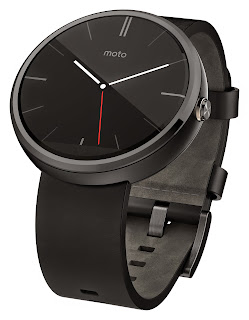
Moto 360 Smartwatch black with black leather band
Moto 360

So why did I want it so badly? 

I am an early adopter of sorts, wearables are just getting started and I want to see them flourish. The reason I wanted one though was for the convenience of having everything on my wrist. I also don't own watches and the only ones I bought in the past were purchased from some sketchy guy in NYC. So I wanted a watch but I also wanted to have the ability to leverage my phone and my watch better.

Let me explain:
By having a smartwatch I can have a password on my phone but never type it in beca
use the phone sees my watch. I usually don't have a lock code because I think they're inconvenient and you end up telling people anyway. With the smartwatch I have the convenience of not having a passcode when my phone is with me and having it locked when I'm away from it. Pretty cool, right?
I can respond to text messages quickly with my voice or used the canned responses. I can also just look at my wrist and see if the notification I got is worth retrieving my phone for.
This is where most people tell me I'm just lazy and wasted money because I don't like the inconvenience of taking my phone out only to see that my friend posted something on Facebook.
And yes from the perspective of somebody who doesn't perceive the value of the watch that is a reasonable response. But let me ask you this, does your $250 watch from wherever do what mine does? No.
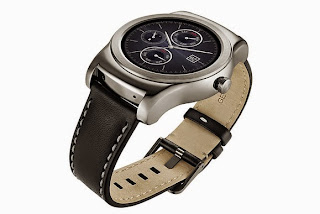
LG G Watch Urbane Luxury Smartwatch
LG G Watch Urbane
Then they say, "but a regular watch looks nicer," again you are correct, but that's not why I got it. I got it because it does all those cool things with my phone. I got it because I wanted a watch with functions, not a fashion statement. You don't buy a smartwatch for what it looks like or for how good of a timekeeper it is. You buy it because it's a cool gadget.
The classic response I get as well is, "I don't understand, if it doesn't do anything your phone can't, or really do anything without your phone, what's the point?"
My reply is usually, "What does a $2,000 Rolex do that this watch and my phone can't do?" Nothing! I can get the time on my watch and I betcha in room full of people I will get more people to ask me about my smartwatch than an expensive Rolex, and you can bet the conversations will be longer too as I'll explain the cool stuff it does. That Rolex will look a million times better without a doubt but to me that isn't important.
To wrap up this rant I want to summarize. People see a new piece of technology these days and expect it to blow their minds. They want it to do something new, it's a sign of the times. We don't see a smartwatch as a big deal but tell someone in the 90's about your smartwatch and they'd be blown away. Apple knows that people think that way and that's why they packed so much stuff into the watch. Viewing your photo album on a watch is impractical but Apple is making it happen. If Steve Jobs was alive he'd go on a rampage, personally I think Steve Jobs would like Android Wear more.
And I'm going to stop there. I will post it rant theory in a future post so subscribe to updates so you can read about that. As always please leave a comment and +1 this.

Samsung Confirms Rumors... Are Ridiculous

Samsung Galaxy S6 Edge Leaked Ad
AT&T Leaked Advertisement

Anybody who had been following the rumor mill for the soon to be announced Samsung Galaxy S6 has probably gotten tired of all the silly renderings and rumors. Anybody can suggest these features, whether or not they hold any merit. Often I wish these companies would just dismiss them so websites can't profit from made up rumors from "sources."

Well my wish has come true, but rather than dismiss the rumors swirling around, Samsung went all out to poke fun at all the silly rumors. Check out this page and see what Samsung thinks of the rumors, it's a quick laugh that will brighten your day so please check it out.
Samsung is expected to reveal the new device to the public at this years Mobile World Congress with the possibility of two variations (the only rumor I find interesting); one normal and another "Edge" phone like the Galaxy Note 4 Edge. The unpacked events (here is last year's) are usually more than your average keynote, they have performances where the new features get shown off. 
Samsung Galaxy S6 Concept Render
Concepts are a popular method to rumor specs

I found a link that has a rundown of all the rumors, if you look at the "early untrue rumors" you can tell it was just click mining. People like me who follow this stuff would rather see genuine articles because I tend to skip anything that says rumor (unless its the Nexus 6 Verizon release date) because it'll be a guess based on nothing. In the article they mention that early rumors suggested Samsung will stick with a 1080p display but as we get closer it appears they will go for QHD. Anybody could have guessed that because its one or the other, 4k on a phone is coming but not now and they won't go back to 720p because they'll never sell the phone. If the person predicting was smarter they'd say QHD is the most likely because the average consumer doesn't realize the total benefit of a 1080p display. So from a marketing standpoint you can't legitimately release a flagship phone who's screen is worse than all the other flagships. Plus the Note 4 has a brilliant QHD display (MKBHD Review) and Samsung is going to use the momentum from that to show off the S6 screen. We have tons of clues as to why they'd choose QHD over 1080p, and it makes me think that the people who post this stuff don't really know what they're talking about. Granted at this point the phone isn't out and I could be wrong too.

Now that this is a full blown rant I'm just going to continue with another theory (so-to-speak) about rumors. I'm sitting here as a blogger who's main source of traffic is probably bots and crawlers yet if one day someone reads this and I'm wrong about QHD, I look really silly. And maybe that's what these freelance writers who are trying to make a living by writing tons of articles and throwing them out there in hopes of getting one published. But why not have more fun with it, why not be honest about it. Don't call it a rumor, call it a guess and back it up. Write a whole article about why you think it'll have a 1080p display, and you don't need facts, this isn't the court of law, you're allowed to speculate and use your perceptions. An article that is based on fact is needed if you want to call it a rumor though, and citing a source that may or may not exist isn't convincing me. Write higher quality articles, have more fun, and just be truthful.  

Comment below and +1's are always appreciated. If any real people read this please leave a comment on anything, discussions are great and it gives me an idea of what you want to read. So don't be afraid!


Saturday, February 21, 2015

Pushbullet App Impressions

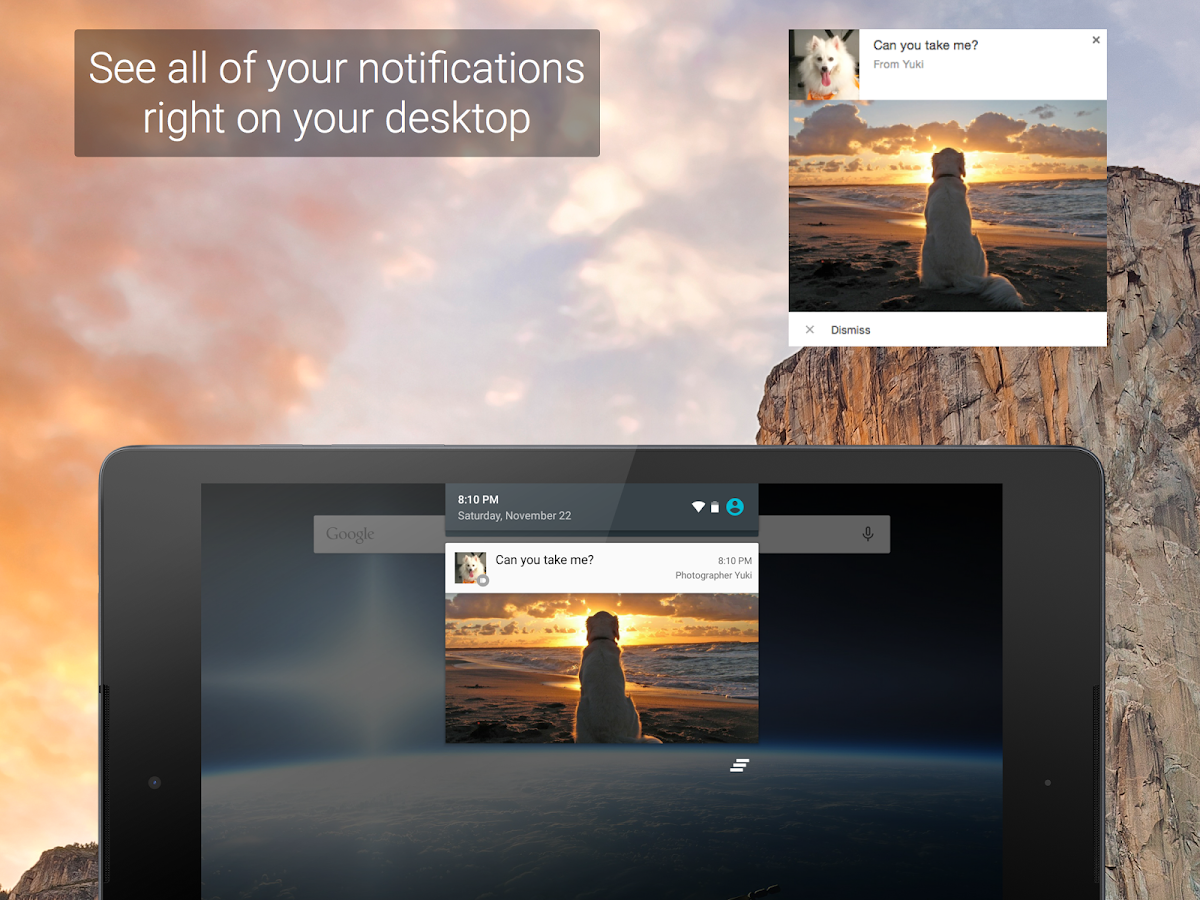
Pushbullet LogoThe next app I want to cover that I have on my phone, tablet, and Chrome is called Pushbullet. This is one of those apps that does many things well and be used to make your phone very very powerful. At its core, Pushbullet is an app that allows you to get all notifications on all your devices, including your computer. What makes Pushbullet especially cool is how it ties into notifications well, for instance, any button such as snooze or dismiss that you can select from the notification bar is also available on other devices. Essentially it allows you to completely manage notifications from another device.

Another neat feature built into the app is the ability to send and respond to SMS messages from any device as well. So if you're like me and have moved to hangouts and don't want to mess with Google Voice numbers then this is the best solution. Works flawlessly and doesn't make you switch messenger apps which in my opinion is the best feature.

Pushbullet Notifications
Quite frankly, the fact that this app works with your existing apps is what makes it special. Instead of compromising by switching to a new SMS app or having a Pushbullet ecosystem, Pushbullet has ways to work with apps, without developers needing to build in the functionality. For instance, one of my favorite features has to be the ability to send webpages from one device to another with ease. I have used autoremote for this but it was inconsistent and since I root restoring autoremote and re-setting it up on all my devices got annoying. Pushbullet ties right into your Google account thus making it simple to sign in and sync devices. By being able to manage notifications I don't need to take my phone out of my pocket to see what is going on, Everything ends up on my desktop or tablet if I happen to be using those.

For more advanced users who have Tasker on their phone there is a Pushbullet plug-in available. This allows you to automate tasks in multiple ways. I personally haven't taken the time to investigate but I've read about some interesting ways people use Pushbullet. I believe for a while somebody was using it to pop breaking news up on their computer when their news app sent a notification. I highly recommend you give this a try with your phone and computer.

Leave comments and press +1 for the article if you liked it!

LINK:
Pushbullet: Select Device


Tuesday, February 17, 2015

Appy Geek App Impressions

Appy Geek is a great app offered by New Republic for anybody who wants to know the latest in tech news. Appy Geek gathers articles from various providers and puts it into categories you create. For instance I have Google, Verizon, Google Nexus, Breaking News, and more all in my front page. I read every day for developing news in the technology world. You can also add your own news sources such as RSS feeds (including this blog) and have all your news in one app. What makes this app unique is that it curates the categories for you and even though a big news item may result in multiple news sources with similar articles it allows you to see the different points of view of different journalists.

I use the app all the time, it is especially good when I need to pass the time while waiting for something or just bored. For AMOLED screen users there is a night mode that will inherently reduce power usage by the screen. I use it on my phone, tablet, and Windows 8.1. The app will send you notifications for breaking news but only about 3-6 times a day depending on what is going on. I recommend this to anybody interested in the latest breaking news in the technology world. Please +1 and share if you liked this article. Comment about other content you'd like to see.

I am starting a new little blurb of short articles about some of my favorite apps that are on my phone and let you know what it does and why it is useful.